


Meb : หนังสือดี นิยายดัง
4.8190.00 Reviews
App Specs
- Version
- Varies with Device
- Updated On
- License
- Free
- Downloads
- 1,000,000+
- Developer
- Meb Corporation PCL
- Categories
- Books & Reference
- Platform
- Android, iOS
Screenshots






 Analysis by AppCompare
I tend to judge a reading app by what happens after the first few minutes: can I find something that suits my mood, read comfortably, and return to it without turning a quiet break into a fiddly task? Meb: หนังสือดี นิยายดัง is aimed at readers looking for Thai books and related reading material in one place. It is a free Books & Reference app from Meb Corporation PCL, with optional purchases, and its strongest appeal is the chance to browse, choose a story, and carry it along for spare moments. The experience is not equally suited to every reader, though: language, screen comfort, and the cost of individual titles all matter.
Exploring the World of Meb
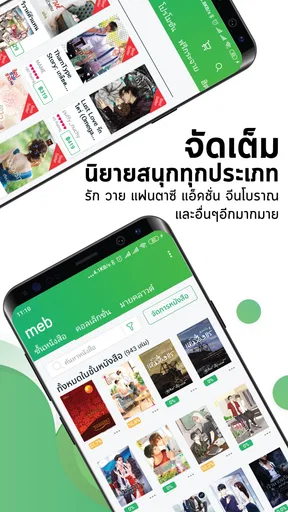
Meb: หนังสือดี นิยายดัง is essentially a digital library that's jam-packed with a wide range of Thai literature, both classic and contemporary. The app is designed to cater to a variety of tastes, offering everything from romantic novels to thrilling mysteries. What’s really cool is that it’s not just a reading platform; it’s a community of sorts where you can discover new stories and share your thoughts with fellow readers.
That focus makes it a more specific choice than a general-purpose e-reader. If you already seek out Thai novels, comics, or magazines, having several kinds of reading in the same app can make browsing feel more natural than switching between separate services. If you mostly want English-language books, or need a broad international catalogue, a larger general ebook shop may be a better starting point. Meb’s identity is clearest when you come to it for Thai reading rather than expecting it to replace every book source you use.
An Intuitive Interface
First impressions matter, and Meb nails it with a sleek and user-friendly interface. Navigating through the app is a breeze, even if you’re not particularly tech-savvy. You can easily browse categories, search for specific titles, or even discover new authors. The app neatly categorizes books, making it simple to find exactly what you’re in the mood for.
For me, browsing by mood is a useful way to approach a catalogue: I might look for a particular kind of story rather than arrive with an exact title in mind. Search works best when you already know what you want, while categories are more helpful when you are open to discovery. A practical habit is to note the title or author of something that catches your eye before leaving the browse screen; that makes it easier to find again if you get interrupted. Readers who prefer a very minimal interface may still find browsing a busy catalogue less relaxing than opening a book they already own.
A Diverse Collection
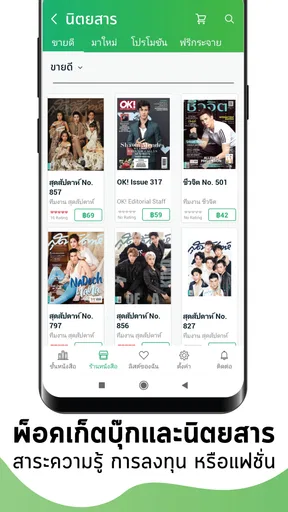
The sheer variety of books available on Meb is impressive. Whether you’re into heartwarming romances, spine-chilling horror, or thought-provoking dramas, Meb has something for everyone. It’s like having a personal library in your pocket, ready to feed your literary cravings anytime, anywhere. Plus, the app regularly updates its collection, so there’s always something new to explore.
The mix of comics, novels, and magazines is especially handy when my available attention changes during the day. A longer novel suits a quiet evening, while a magazine or comic can be an easier choice during a short wait. That flexibility is a more meaningful strength than simply having a large shelf: different formats fit different kinds of breaks. Still, a broad selection can also make it easy to spend longer browsing than reading, so I’d go in with a genre, author, or reading mood in mind when I have limited time.
Worth Reading Before You Choose

EA SPORTS FC Mobile 26 Is a Bigger Football Game, but It Takes Time

Flipboard Shows What News Apps Must Do Beyond the Feed

Switching to Android Auto Means Rethinking Your Driving Routine

Google Calendar Makes a Crowded Week Easier to Manage

Ludo King Makes the Most of the Minutes Between Plans

Baby Panda World Brings Quick Play to Modern Phones, but Its Game Library Feels Busy
Readers deciding whether this is the right home for their library should also consider language before spending time exploring. The app’s Thai focus is an advantage for people who read Thai comfortably and want stories, comics, and magazines in that space. It is a real limitation for anyone who needs English text for everyday reading or depends on translation to follow a book. I would check the language and sample available details for a title before committing to a purchase, especially if I am choosing an unfamiliar author.
Reading Features and Customization
One of the standout features is the level of customization available for your reading experience. You can adjust the font size, change the background color, and even switch to night mode for a more comfortable reading session in low light. These little touches make a big difference in how enjoyable the app is to use.
Those controls can help readers who find small text tiring, or who prefer a softer screen in the evening. I would treat them as useful comfort options, not as a guarantee that every book will be equally easy to read: page design and the format of a particular title can affect how much control you have. A sensible first step is to adjust the text and background before settling into a long session, rather than waiting until your eyes feel strained. If you usually read on a larger screen, compare the same kind of material there before deciding that a phone is comfortable for extended chapters.
Motor and Sensory Comfort
Reading on a phone can be convenient, but it asks you to hold a small device, keep your place, and make occasional taps or swipes. Font and background adjustments reduce some visual friction, yet they do not remove the physical demands of a long session. I find it more realistic to use Meb in shorter stretches when I am standing or commuting, and save lengthy chapters for a moment when I can rest the device securely. A stand or a stable surface can make a difference for anyone who finds prolonged gripping uncomfortable.
Night mode is a thoughtful option for dim rooms, but a darker screen is not automatically comfortable for every reader. Some people prefer brighter text on a light background, while others find the reverse easier on their eyes. I would test both in the lighting where I actually read instead of assuming one setting will work everywhere. In a noisy or visually busy setting, choosing a familiar title in advance also helps: less time spent browsing means more attention left for the page.
For readers who rely on assistive tools or particular input methods, the most dependable approach is to try a short reading session before buying several books. Check whether the text presentation, navigation, and your device’s own accessibility settings work together in the way you need. That is not a knock against the app; it is a practical reminder that comfort depends on the combination of a book’s layout, the screen, and the reader’s preferences.
Offline Reading and Everyday Use
For those times when you’re off the grid, Meb allows you to download books for offline reading. This is perfect for long commutes or when you’re traveling and don’t have access to Wi-Fi. Just download your favorite titles in advance, and you’re all set to dive into a good story whenever the mood strikes.
The useful detail is the timing: prepare before you leave, while you have a connection, rather than counting on a last-minute download at a station or in a waiting room. For a daily commute, I would choose one book and one shorter option beforehand, then open them once settled. That keeps the reading choice simple and reduces the chance of relying on mobile data when it is inconvenient. Offline access is also useful during travel, but it is still worth opening a downloaded title before departure so you know it is ready on your device.
For example, I might browse at home on Sunday, pick a novel for the week, and download it before heading out. On a crowded train, I can open the book directly rather than searching through the catalogue while juggling a bag. If I have only a few minutes before an appointment, a comic or magazine gives me a natural stopping point. That small bit of planning is where Meb feels most convenient: it turns waiting time into reading time without requiring a lengthy setup in the moment.
Community and Social Features
What really sets Meb apart is its community aspect. You can engage with other readers, leave reviews, and even follow your favorite authors. This social component adds a layer of interaction that makes the reading experience more dynamic and engaging. It’s like being part of a book club where you can share insights and recommendations.
I see the social side as most useful when I am deciding what to read next. Other readers’ reactions can give me a reason to investigate a title, and following an author can help keep their work on my radar. It is not a substitute for judging whether a book suits my taste, though: a popular response does not tell me whether the writing, subject, or tone will work for me. I would use reviews as clues, then make my own call rather than treating them as a guarantee.
Readers who prefer books to remain a private, quiet activity can simply focus on the reading itself; social features are an extra, not the reason everyone needs the app. Conversely, someone who wants a lively discussion space built around clubs, group reading schedules, or direct conversation may find a dedicated community platform more suitable. Meb’s social element is appealing as a discovery aid, but I would not choose it solely for a full-featured book-club experience.
Price, Purchases, and Choosing What to Read
While the app itself is free to download, some books require purchase. However, there are plenty of free titles available, and the paid options are reasonably priced. The app occasionally offers promotions and discounts, so you can snag some great deals on your favorite reads. It’s a cost-effective way to enjoy a vast array of literature without breaking the bank.
In practice, “free app” and “free reading” are different things: some individual content can cost money, and optional in-app purchases range from about a dollar to a little over two hundred dollars per item. I would treat each title as its own decision, check its price before purchasing, and make a short reading list rather than adding books impulsively while browsing. That is especially sensible with a series, where one appealing first volume can lead to several separate purchases. A reader who wants a fixed monthly budget or an all-you-can-read subscription should compare those models before making Meb their main source.
There is enough audience interest to make the catalogue worth exploring: Meb has a 4.8 average from around 51,000 ratings and more than a million installs. Those figures are encouraging, but they do not tell me whether a particular title is available in the language, format, or style I want. I would use them as context, not as a shortcut around checking the actual books. The app is free to install, is rated Teen, and has been around since May 14, 2012; for a family device, I would still make content choices with the intended reader in mind rather than relying on the age label alone.
Who Meb Suits—and Where It Falls Short
I would recommend Meb first to someone who reads Thai and wants a convenient place to browse several kinds of material, including novels, comics, and magazines. It also suits people who like discovering authors through categories and reader reactions, and those who can prepare downloads before a commute or trip. The developer is Meb Corporation PCL, and the app’s clear focus makes it feel more relevant to that audience than a general reader that happens to carry a limited selection of Thai titles.
I would look elsewhere if my main priority were English-language reading, a large-screen reading experience, or a subscription that makes spending predictable. A dedicated e-reader can be a better choice for someone who reads for hours and values a device designed around long sessions. A general ebook service may suit a reader who wants a wider range of languages, while a library app may fit someone who prefers borrowing to buying. Those alternatives do not make Meb less useful; they simply serve different habits.
Its main trade-offs are practical rather than mysterious: the Thai emphasis narrows its usefulness for other language readers, individual purchases require attention to price, and reading comfort still depends on screen size, layout, and how long you hold the device. I would not assume every title offers the same degree of visual flexibility just because text and background controls are available in the app. Trying a free or already-purchased title first is a low-risk way to see how the reading experience fits your eyes and hands.
In conclusion, Meb: หนังสือดี นิยายดัง is a must-have app for anyone who loves to read. Its extensive library, intuitive interface, and interactive community make it a standout choice for book enthusiasts. Whether you’re a seasoned reader or just starting to explore the world of Thai literature, this app provides a convenient and enjoyable reading experience. So why not give it a try? You might just find your next favorite novel waiting for you.
My recommendation comes with one qualification: it is a particularly good match when Thai reading is already part of your life, not a universal replacement for every bookstore, library, or e-reader. Start by browsing for a familiar genre, test the available reading adjustments, and try an offline download before relying on it for travel. If those steps feel comfortable and the titles appeal to you, Meb can make everyday gaps—commutes, queues, and quiet evenings—easier to fill with something you actually want to read.
Pros
- Extensive library of popular novels.
- User-friendly and intuitive interface.
- Offline reading mode available.
- Regular updates with new content.
- Customizable reading settings.
Cons
- Limited free content options.
- Requires internet for initial download.
- Some novels only in Thai language.
- Ads present in free version.
- In-app purchases can be pricey.
FAQs for Meb : หนังสือดี นิยายดัง
What is Meb : หนังสือดี นิยายดัง?
Meb : หนังสือดี นิยายดัง is a popular e-book platform designed for Android and iOS users, offering a vast collection of quality books and famous novels. The app caters to readers who enjoy diverse genres, from romance to thrillers, providing a seamless reading experience with customizable settings and offline reading capabilities.
How can I purchase books on Meb?
Purchasing books on Meb is straightforward. Users can browse the extensive library and select their desired titles. Payment can be made through various methods, including credit cards and digital wallets. Once purchased, the books are stored in your library, accessible anytime for reading.
Does Meb offer free books or samples?
Yes, Meb provides users with access to a selection of free books and samples. This allows readers to explore different genres and authors without any cost. The app frequently updates its free section, giving users the chance to discover new stories and writers.
Is an internet connection required to use Meb?
While an internet connection is necessary to download and purchase books, Meb allows users to read their downloaded content offline. This feature is perfect for those who wish to read on the go, without worrying about internet availability or data usage.
Can I customize the reading experience on Meb?
Absolutely, Meb offers several customization options to enhance your reading experience. You can adjust font size, background color, and brightness to suit your preferences. These features ensure a comfortable reading experience, whether you’re reading in daylight or at night.


